Interactive Furniture Layout Using Interior Design Guidelines

Interactive Furniture Layout Using Interior Design Guidelines

We present an interactive furniture layout system that assists users by suggesting furniture arrangements that are based on interior de-sign guidelines. Our system incorporates the layout guidelines as terms in a density function and generates layout suggestions by rapidly sampling the density function using a hardware-accelerated. Monte Carlo sampler. Our results demonstrate that the suggestion generation functionality measurably increases the quality of furniture arrangements produced by participants with no prior training in interior design
 
Frniture 

Introduction
You are moving into a new home and need to arrange the living room furniture. You have a sofa, armchairs, coffee table, end tables, ottomans,  and a media center.   What arrangement will create the
most comfortable and visually pleasing setting for your home?  

Furniture placement is challenging because it requires jointly opti mizing a variety of functional and visual criteria.  Skilled interior designers follow numerous high-level guidelines in producing fur-
niture layouts [Lyons 2008; Ward 1999].  In a living room for example, the furniture should support comfortable conversation, align with prominent features of the space,  and collectively form a vi-
sually balanced composition.  In practice these guidelines are often imprecise and sometimes contradictory. Experienced designers learn  to  balance  the  tradeoffs  between  the  guidelines  through  an iterative trial-and-error process.

Yet  most  people  responsible  for  furnishing  a  new  home  have  no training in interior design.  They may not be aware of interior design guidelines and they are unlikely to have the tacit knowledge
and  experience  required  to  optimally  balance  the  tradeoffs.   Instead such amateur designers rely on intuitive rules such as pushing large furniture items against the walls.

These intuitive rules often lead  to  functionally  ineffective  and  visually  imbalanced  arrangements [Lyons 2008].  The resulting furniture layouts “simply don’t look or feel right,” and even worse the amateur designer “can’t pin-point what the problems are” [Ward 1999].

In  this  paper,  we  identify  a  set  of  interior  design  guidelines  for furniture layout and develop an interactive system based on these guidelines.  In our system, the user begins by specifying the shape
of a room and the set of furniture that must be arranged within it. The  user  then  interactively  moves  furniture  pieces.   In  response, the system suggests a small set of furniture layouts that follow the interior design guidelines.  The user can interactively select a suggestion and move any piece of furniture to modify the layout. Thus, the user and computer work together to iteratively evolve the design(Figure 1).

Interactive Furniture Layout Using Interior Design Guidelines


Our  approach  represents  the  furniture  layout  guidelines  as  terms in  a  density  function  and  treats  manual  placement  of  pieces  as subspace constraints.   Since the resulting function is highly multi modal, we employ a Markov chain Monte Carlo sampler to suggest optimized layouts.  To deal with the substantial computational requirements of stochastic sampling, we use graphics hardware to
enable interactive performance.

In  summary,  our  work  makes  two  main  contributions.   First,  we identify  and  operationalize  a  set  of  design  guidelines  for  furniture layout.   Second,  we develop an interactive system for creating furniture arrangements based on these guidelines.  Our results demonstrate that the suggestion generation functionality of our system measurably increases the quality of furniture arrangements produced by users with no prior training in interior design.
Share:

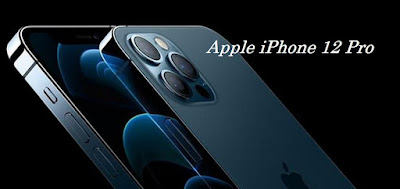
How to care for iPhone 12 Pro

How to care for iPhone 12 Pro

iPhone is arguably one of the flagship smartphones in the world. In addition to premium technology, the price is also very fantastic.

The latest smartphone from Apple's own vendor is the iPhone 12 Pro Max. Extra careful care is needed so that your iPhone 12 Pro Max phone lasts.


How to care for iPhone 12 Pro

1. Protect the Phone Body with Case and Screen Protector

The first tip to make your iPhone last longer is to use a case and screen protector to protect the iPhone 12 Pro body. This case protects the iPhone from various impacts, especially when dropped or hit by hard objects. The same goes for screen protectors.

Tempered glass or screen protector reduces the risk of the screen breaking or cracking when dropped. Therefore, store your iPhone 12 Pro in a really safe place so that it doesn't fall off easily.

Now, to be more secure, you can use a protective case that is thick and tightly wrapped around your favorite iPhone 12 Pro.

2. Use Original Battery Charger

There are many reasons why iPhone 12 Pro users are advised to use an original charger or charger. This is to avoid a short circuit and keep the battery and iPhone components durable.

Dumb chargers usually don't have a current count that matches the iPhone 12 Pro device. Also avoid charging using low resources such as a power bank or usb charger port.

3. Don't Use iPhone When It's Charging

Operating iPhone 12 Pro while it is charging is prone to short circuits. In addition, charging while doing online gaming activities that are quite heavy can burden the performance of your iPhone battery.

Excessive battery performance can cause the battery to overheat, resulting in a decrease in the quality of iPhone components. The long-term impact is to make the battery drain quickly alias damaged due to power down.

Therefore, turn off the cellphone while charging so that your iPhone battery lasts longer.

How to care for iPhone 12

4. Charge the battery when it reaches 20%

The next tip that you can do in order to maintain the health condition of the iPhone battery is to immediately recharge it when the battery power reaches 20%. It is also recommended that you charge your iPhone 12 to a maximum of 80%, not to 100%.

When charging, remove the protective case to reduce heat on the iPhone 12 device. You can put the case back on when it's finished charging.

5. Use Auto Brightness and Low Power Mode

To save iPhone battery, please use the automatic brightness setting. This setting will make the screen adjust the display brightness based on the light in the room.

Usually in dark places or at night, the iPhone 12 screen will increase the brightness so that the display of text and images on the screen is more clearly visible. Another tip that you can try is to use low power mode to save battery usage.

6. Always Update the iOS System to the Latest Edition

The reason Apple vendors often update the iOS system is to patch security holes that occur and optimize the performance of the iPhone 12 handset. We recommend updating to the latest iOS so that your smartphone has optimal performance and is more durable because it is not easily damaged.

Remember, update your iPhone operating system on the official App Store. There are many dangers lurking in terms of data security if you update not from the official App Store from Apple.

7. Protect iPhone 12 from High Temperature and Water

iPhone 12 is very susceptible to temperatures that are too hot, therefore avoid using this iPhone 12 for too long in a hot room temperature. High temperatures are also the reason why the iPhone 12 battery deteriorates quickly, or even makes your iPhone 12 die suddenly.

Avoid using iPhone in direct sunlight for a long time. Don't use your iPhone while you're in a sauna, or even put your iPhone on the dashboard of a car that's often exposed to direct sunlight for long periods of time.

Keep in mind, even though the iPhone 12 is water-resistant, it's best if you keep your iPhone 12 away from water to reduce the risk of damage.

This is because Apple does not accept a water-damaged iPhone warranty. What's more, the longer your iPhone ages, the less effective its waterproof protective or adhesive tape will be.

If that happens, it would be better if you immediately upgrade your iPhone 12 to the latest iPhone series. There is an iPhone 13 Pro Max that you can buy.

8. Regularly Cleaning iPhone 12

The last tip you can do to keep your iPhone 12 durable and not easily damaged is to be diligent in cleaning your iPhone 12 every few weeks. In addition to cleaning the outside or body of the iPhone, also clean the junk files left in the iPhone 12 system.

You can also do a screen refresh every day so that the performance of the iPhone 12 and the screen display remains smooth. Regularly cleaning your iPhone will keep your smartphone looking good and looking good.

You might also want to consider cleaning the charger port or iPhone 12 speaker from dust using a soft brush so that the charging quality and sound from your cellphone speaker remains stable.

Those are some tips for caring for the iPhone 12 so that it is more durable and doesn't get damaged quickly. Remember, take good care of your cellphone from misuse due to falling or being submerged in water because the iPhone warranty does not cover these things. Congratulations on caring for your beloved iPhone!

Share:

Apple iPhone 13 Pro Max User Guide

Apple iPhone 13 Pro Max User Guide

Apple iPhone 13 Pro Max User Guide.

This time we will discuss a little Apple iPhone 13 Pro Max User Guide. Before discussing the Apple iPhone 13 Pro Max User Guide, we will first discuss some things related to the iPhone 13 Pro Max.

Before using the iPhone 13, make sure your iPhone 13 is set up with all the necessary support to support the running of your iPhone 13 system.

iPhone 13 Pro Max

 Apple iPhone 13 Pro Max User Guide

The following are things that are very important for the iPhone 13 to support the operation of the iPhone 13 Pro system:

Add Apple ID on iPhone 13

How to create a new Apple ID

Use the same Apple ID to enjoy all Apple services. The only information required is your full name, date of birth, email address and phone number.

     Create an Apple ID on your iPhone, iPad, or iPod touch
     Create an Apple ID on Mac
     Creating an Apple ID on a Windows PC
     Create an Apple ID on another device

Create an Apple ID on your iPhone, iPad, or iPod touch

You can create a new Apple ID when you set up your device, or set it up later in the App Store.

Creating an Apple ID when setting up the device

   -  Tap "Forgot password or don't have an Apple ID?".
   -  Tap Create a Free Apple ID.
   -  Select a date of birth and enter a name. Tap Next.
   -  Tap "Use a current email address" or tap "Get a free iCloud email address."
   -   If prompted, follow the on-screen steps to verify your email address and set up two-factor authentication. If you choose to skip this step, you will be prompted to do so later in Settings.

Apple iPhone 13 Pro Max Specifications

COLORS Graphite Grey, Gold, Silver, Sierra Blue

Ceramic Shield Front

Textured matte glass back and stainless steel design
MEMORY 128 GB, 256 GB, 512 GB, 1 TB
SCREEN Super Retina XDR Display with ProMotion

6-inch (diagonal) all-in-one OLED display

Resolution 2532 x 1170 pixels at 460 ppi
CHIP A15 Bionic chip

New 6-core CPU with 2 performance cores and 4 efficiency cores

New 5-core GPU

New 16-core Neural Engine
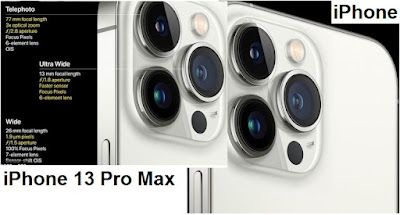
CAMERA 12 MP Pro camera system: Telephoto, Wide and Ultra Wide cameras

Telephoto: /2.8 . aperture

Wide: /1.5 . aperture

Ultra Wide: /1.8 aperture and 120° . field of view

3x optical zoom zoom in, 2x optical zoom zoom out; 6x . optical zoom range

Digital zoom up to 15x

Night mode portrait made possible by LiDAR Scanner

Portrait Mode with enhanced bokeh and Depth Control

Portrait Lighting with six effects (Natural, Studio, Contour, Stage, Stage Mono, High-Key Mono)

Dual optical image stabilization (Telephoto and Wide)

Motion sensor optical image stabilization (Wide)

Six-element lenses (Telephoto and Ultra Wide); seven element lens (Wide)

Flash True Tone with Slow Sync

Panorama (up to 63 MP)

Sapphire crystal lens cover

100% Focus Pixels (Wide)

Night Mode

Deep Fusion

Smart HDR 4

Photography Style

Macro photography

Apple ProRAW

Taking photos and Live Photos with a wide color range

Lens correction (Ultra Wide)

Photo location marker

Photo location marker

Automatic image stabilization

Burst mode

Captured image format: HEIF and JPEG
BATTERY Video playback:

Up to 22 hours

Video playback (streaming):

Up to 22 hours

Audio playback:

Up to 75 hours
SENSOR

Face ID

LiDAR Scanner

Barometer

Three-axis gyro

accelerometer

Proximity sensor


Operating system iOs 15

Apple iPhone 13 Pro Max User Guide

Apple iPhone 13 Pro Max User Guide


Share:

iPhone 13 Release Date

iPhone 13  Release Date

This time, the biggest mobile phone company, Apple iPhone, made another best change compared to the previous year, this time Apple launched the iPhone with the iPhone 13 Pro Max series which is sure to perfect the previous iPhone.

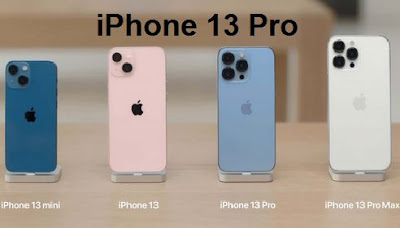
iPhone 13 comes immediately complete in four variants. The four models are iPhone 13, iPhone 13 mini, iPhone 13 Pro, and iPhone 13 Pro Max.
Also note that for those of you who want to immediately have an iPhone 13, you can get it through offline stores, the iPhone 13 series line up is also available in the online marketplace. So it would be nice for loyal iPhone customers not to miss this super iPhone 13 Pro Max.

iPhone 13 Pro Max

In addition, the iPhone 13 Pro Max has a Super Retina XDR Display with Pro Motion 6.7-inch (diagonal) all-in-one OLED display with a resolution of 2778 x 1284 pixels at 458 ppi.

The iPhone 13 Pro Max screen has curved corners that follow a beautifully curvy design, and all of these corners fall within a standard square plane. When measured as a standard square, the screen measures 6.68 inches diagonally (the screen area is smaller).

iPhone 13 Pro

iPhone 13 Specification

COLORS Graphite Grey, Gold, Silver, Sierra Blue

Ceramic Shield Front

Textured matte glass back and stainless steel design
MEMORY 128 GB, 256 GB, 512 GB, 1 TB
SCREEN Super Retina XDR Display with ProMotion

6-inch (diagonal) all-in-one OLED display

Resolution 2532 x 1170 pixels at 460 ppi
CHIP A15 Bionic chip

New 6-core CPU with 2 performance cores and 4 efficiency cores

New 5-core GPU

New 16-core Neural Engine
CAMERA 12 MP Pro camera system: Telephoto, Wide and Ultra Wide cameras

Telephoto: /2.8 . aperture

Wide: /1.5 . aperture

Ultra Wide: /1.8 aperture and 120° . field of view

3x optical zoom zoom in, 2x optical zoom zoom out; 6x . optical zoom range

Digital zoom up to 15x

Night mode portrait made possible by LiDAR Scanner

Portrait Mode with enhanced bokeh and Depth Control

Portrait Lighting with six effects (Natural, Studio, Contour, Stage, Stage Mono, High-Key Mono)

Dual optical image stabilization (Telephoto and Wide)

Motion sensor optical image stabilization (Wide)

Six-element lenses (Telephoto and Ultra Wide); seven element lens (Wide)

Flash True Tone with Slow Sync

Panorama (up to 63 MP)

Sapphire crystal lens cover

100% Focus Pixels (Wide)

Night Mode

Deep Fusion

Smart HDR 4

Photography Style

Macro photography

Apple ProRAW

Taking photos and Live Photos with a wide color range

Lens correction (Ultra Wide)

Photo location marker

Photo location marker

Automatic image stabilization

Burst mode

Captured image format: HEIF and JPEG
BATTERY Video playback:

Up to 22 hours

Video playback (streaming):

Up to 22 hours

Audio playback:

Up to 75 hours
SENSOR

Face ID

LiDAR Scanner

Barometer

Three-axis gyro

Accelerometer

Proximity sensor


Operating system iOS 15

iPhone 13 Pro Max Spec

Share:

How To Prevent Samsung Galaxy S22 From Slowing Down

 How To Prevent Samsung Galaxy S22 From Slowing Down

Samsung always strives to launch its newest products in a short time. Ranging from low to high, Samsung has a wide variety of smartphones on its list. Galaxy is another smartphone from Samsung with the right specs and an attractive design. A small number of Samsung Galaxy users or Samsung Galaxy fans report performance issues after using the Samsung Galaxy for several months.

Samsung Galaxy S22

Here are suggestions that you can do so that your Samsung Galaxy S22 avoids slowness or ancient loading. Before discussing the tips, of course, you want to recognize additionally the reason of your Samsung Galaxy S22 gradual when used, due to the fact there are many motives of gradual Galaxy s22, which includes full reminiscence due to many downloaded functions or many unimportant archives saved on inner memory. So right here you are very vital to comprehend the motive first.

Here are recommendations you can do so that your Samsung Galaxy S22 avoids gradual or lengthy loading.

Uninstall Application.


The first Uninstall Unnecessary Applications On the Samsung Galaxy S22 device, if there are quite a few established purposes that are now not used a good deal or are no longer very important. So, make certain to get rid of such apps from your Samsung Galaxy S22 so that it does not gradual down. Also, take a look at for purposes that are eating giant reminiscence and are no longer being used, uninstall them immediately. Unnecessary apps will devour storage and gradual down your machine performance. So, constantly make positive to take away such apps from the machine for easy performance.
Clear Cache and Wipe Cache Partition

How To Prevent Samsung Galaxy S22 From Slowing Down 

Samsung Galaxy S22


Samsung Galaxy S22 customers simply use a lot of apps on their devices, and few overlook to clear cache from apps. It can have an effect on machine overall performance and additionally occupy storage space. So, Check into app supervisor and go to every app to clear cache. If you are nevertheless going through low overall performance trouble on your Samsung Galaxy S22 even after clearing cache of apps, flip off your smartphone and enter restoration mode. Now, pick the Wipe Cache partition and then choose reboot system. You can now see the distinction in your phone's performance.

if the pointers above have been carried out and the effects are no longer optimal, now is the time for you to use the final move, particularly by means of Factory Reset.


Factory Reset

Factory reset is an choice that will wipe all your system records and make it new. So, earlier than intending to Factory Reset your device, make certain to take a facts backup. After all records is backed up, appear for the 'Factory Reset' choice in Settings > Backup and Reset. Tap on the choice and it will whole the manner in a few minutes.

Good success correct luck. and optimistically the Samsung galaxy S22 does not trip issues like slow.

Share:

Nokia X50 New Release Date

Nokia X50 New Release Date

Nokia is about to launch a flagship Product with a huge 12GB RAM, 8900mAh battery and an amazing 108MP camera. namely Nokia X50 Pro, for Nokia X . specs

Nokia X50 Pro Specifications

Not too long ago, we've heard various news about the upcoming flagship Nokia X series phones. The Nokia X50 Pro lineup includes the Nokia X90 Pro, Nokia X90 Premium, Nokia X20,… In particular, the Nokia company is reportedly preparing to launch a new phone in the X collection, dubbed Nokia X50 Pro. Apart from that, this phone will hit the market with amazing features, powerful performance, and a very luxurious look.

First, the Nokia X50 Pro camera is surprisingly a quad lens on the back panel. It consists of a 108MP main lens + 20MP ultra-wide shooter + 5MP macro snapper + 2MP depth sensor. Back to the front, the device has a single 44MP punch-hole lens for taking selfies and making video calls. On the other hand, the Nokia X50 runs with Android 11 as its operating system. Check out the processor and other specifications of the Nokia X50 phone.

Nokia X50 Pro

Nokia X50 5G Pro

Hardware-wise, the Nokia beast draws power from the Qualcomm Snapdragon 888 Chip set. Furthermore, the Nokia X50 Pro specs flaunt a 6.5-inch Super AMOLED with a resolution of 1440 x 2880 pixels. Apart from that, the Nokia handset comes with 10GB/12GB RAM and two internal storage options: 256GB/512GB. In addition, it can be expanded up to 1TB via the Micro SD card slot. Are you looking for capacity? In detail, the Nokia device has a massive 8900mAh energy cell that supports 33W Dart Charger. In addition, the security system includes an in-display fingerprint scanner.

Nokia X50


Share:

iPhone 14 New Release Date

iPhone 14 New Release Date

 There has been news from the media that Apple is working on a potentially game-changing upgrade for next year, namely the iPhone will be releasing its newest product, the iPhone 14.
 
The Apple iPhone 2022 is little known due to the nature of the iPhone releases already circulating on The "iPhone 14" will have many of the same design aspects and features as the iPhone 12 and "iPhone 13", but may mark a significant change in the lineup, and of course the iPhone 14 will be classier than the iPhone 12 or iPhone 13.

iPhone 14

iPhone 14 New Release Date

iPhone 14 New Release Date


iPhone 14 New Release Date

Share: